CMYK in Printing explains why colors on your screen often look different once they are printed on paper. Many users notice this when printing photos or documents—the digital version appears bright and vivid, while the printed result looks softer and slightly muted.
This gap happens due to differences in printer color technology and how colors are produced. Screens rely on light to display images, while printers apply ink onto paper through a controlled color printing process. These two systems follow completely different principles, which leads to visible changes in color output.
Printers use the CMYK color system to create images. Instead of generating light, they combine four inks—cyan, magenta, yellow, and black—to build colors step by step. Each color is formed by layering these inks in precise amounts.
This method allows printers to reproduce a wide range of tones, even though the result may not match what you see on a screen. The difference is not a flaw, but a result of how ink interacts with paper.
What Is CMYK in Printing
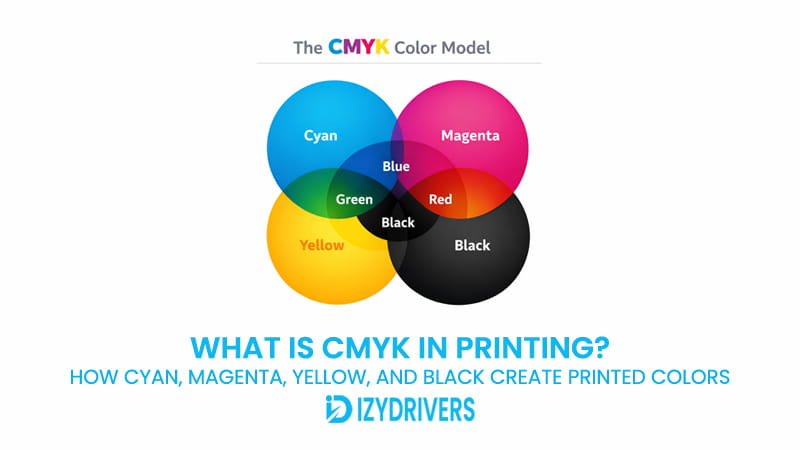
CMYK in Printing is a color model used by printers to produce images using ink instead of light. It is built on four primary colors: cyan, magenta, yellow, and black. These inks are combined in controlled proportions to create the final printed result.
In everyday printing, CMYK in Printing acts as the foundation for color output. Whether you print documents, photos, or marketing materials, the printer relies on this system to reproduce colors on paper.
The process works by placing extremely small ink dots onto the surface. Through the CMYK printing process, these dots blend visually, allowing the printer to simulate a wide range of colors using only four inks.
The CMYK color model is widely used across the printing industry. It supports consistent results in color reproduction printing, making it suitable for both office and commercial use.
The CMYK color model uses four primary inks—cyan, magenta, yellow, and black—to build printed images by combining them in different ratios. By adjusting how much of each ink is applied, printers can generate detailed and accurate color output on paper.
Unlike digital displays, CMYK in Printing depends on ink absorption. Printed colors are created through physical interaction between ink and paper, which explains why they often appear less vibrant than screen-based colors.
What Does CMYK Stand For
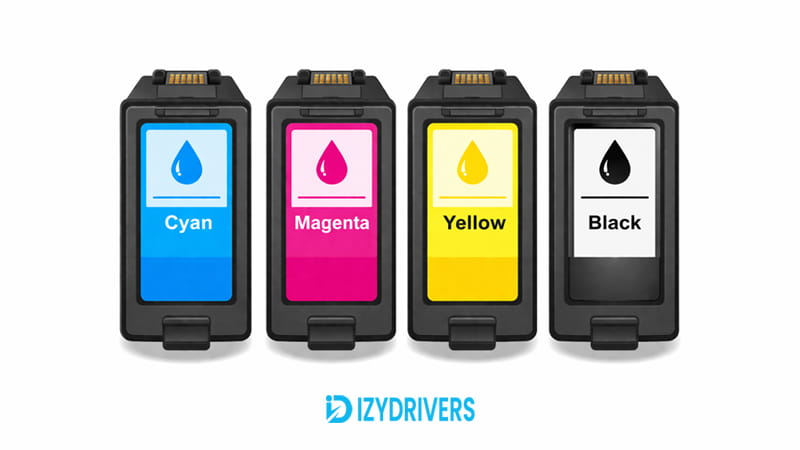
The term CMYK stands for Cyan, Magenta, Yellow, and Key (Black). Each ink has a specific role in the CMYK in Printing system and contributes to how colors are formed on paper.
Cyan
Cyan absorbs red light and helps produce cooler tones. It is essential for creating blues and greens in printed images.
Magenta
Magenta absorbs green light and plays a key role in forming reds and purples. It adds depth to many color combinations.
Yellow
Yellow absorbs blue light and is used to create warm tones. It helps balance brightness in printed output.
Black (Key)
Black improves contrast and sharpness. It ensures text appears clear and reduces the need to mix large amounts of color ink.
How the CMYK Color Model Works in Printing
CMYK in Printing builds color through a layering technique that relies on ink placement rather than light emission. Printers apply tiny dots of ink onto paper, and these dots combine visually to form complete images.
This method is based on how ink interacts with light after it reaches the paper surface. Each layer affects how light is absorbed and reflected, which determines the final color seen by the human eye.
Subtractive Color Mixing Explained
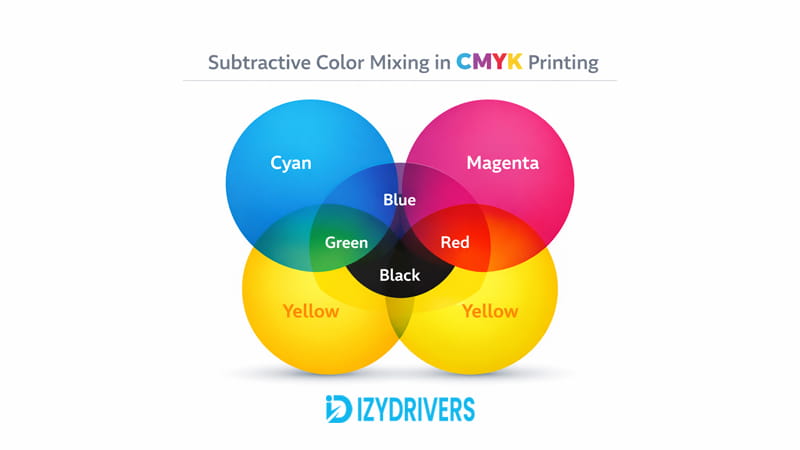
The core of CMYK in Printing lies in subtractive color mixing. This process works by removing certain wavelengths of light as ink is layered onto paper.
In printing, cyan, magenta, yellow, and black inks are applied in very small layers. When combined at different intensities, these layers allow printers to produce millions of colors through subtractive color mixing, where ink absorbs part of the light and reflects the remaining color to the viewer.
Each ink plays a filtering role. Cyan removes red tones, magenta removes green, and yellow removes blue. Through this CMYK color mixing approach, printers can control color output with high precision.
This technique forms the foundation of the entire color printing process, allowing detailed images to appear even with a limited number of base inks.
How CMY Colors Combine to Create New Colors
Color creation in CMYK in Printing depends on how cyan, magenta, and yellow interact. By combining these inks in different ratios, printers can generate a wide range of colors.
| CMY Combination | Resulting Color |
|---|---|
| Cyan + Yellow | Green |
| Magenta + Yellow | Red |
| Cyan + Magenta | Blue |
| Cyan + Magenta + Yellow | Dark tone |
These combinations happen at a microscopic level. The printer places tiny dots close together, and the human eye blends them into a single visible color.
Why Black Ink Is Added to the CMYK System
Black ink is essential in CMYK in Printing for achieving depth and clarity. While cyan, magenta, and yellow can create dark tones, the result often lacks sharpness.
Adding black improves contrast and ensures text appears crisp. It also stabilizes color output and reduces excessive use of color inks.
This makes printing more efficient while maintaining consistent and professional results.
How Printers Apply CMYK During the Printing Process
CMYK in Printing moves from theory into real hardware at this stage. The printer takes digital color data and translates it into physical output using ink or toner. Every color you see on paper comes from controlled placement of cyan, magenta, yellow, and black.
The process depends heavily on printer color technology. Each printer type uses a different method to place color, yet both follow the same principle of layering CMYK values. The printer reads the file, converts it into printable instructions, and then applies color through a precise color printing process.
In practice, CMYK in Printing means breaking an image into four color channels. Each channel controls how much ink or toner is applied in specific areas. These layers are then combined on paper to form the final image.
The result is not a single pass of color, but multiple layers working together. This is where CMYK in Printing becomes visible, as the printer builds color gradually rather than all at once.
CMYK in Inkjet Printers
Inkjet devices handle CMYK in Printing through microscopic nozzles. These nozzles spray ink onto paper in extremely small droplets, often measured in picoliters. The size and placement of each droplet determine how the final color appears.
In inkjet color printing, the printer head moves back and forth while ejecting ink in controlled patterns. Each pass adds another layer of color, contributing to the final image. This method allows smooth gradients and detailed photo output.
The key factor here is printer color mixing. Inkjet printers do not mix colors before applying them. Instead, they place tiny dots of different inks close together. The human eye blends these dots into a single color.
This approach relies on advanced printer color technology to control droplet size, spacing, and overlap. Smaller droplets produce finer detail, while larger ones help fill areas quickly.
With CMYK in Printing, inkjet printers can simulate millions of colors by adjusting how much ink is sprayed in each area. The result is a soft transition between tones, which is why inkjet printers are often preferred for photo printing.
CMYK in Laser Printers
Laser devices apply CMYK in Printing using a completely different mechanism. Instead of liquid ink, they rely on toner powder made from fine particles of cyan, magenta, yellow, and black.
The process begins with an imaging drum. A laser draws the image onto the drum by creating an electrostatic pattern. This pattern determines where toner will stick during the laser printer color process.
Once the pattern is ready, toner is applied to the drum. Each color is transferred in sequence, building the image layer by layer. This is how toner color printing forms the final output.
After transfer, the paper passes through heated rollers. The heat melts the toner, bonding it permanently to the paper surface. This step ensures durability and sharpness.
Compared to inkjet, laser printers produce cleaner edges and more consistent text. In CMYK in Printing, this makes laser devices ideal for documents, charts, and materials that require precise detail.
How Printers Reproduce Detailed Images Using CMYK
CMYK in Printing does more than place color on paper. It also controls how detail and texture appear in the final output. Even complex images with gradients and shadows are built using simple dot patterns.
The printer cannot create continuous tones directly. Instead, it simulates them through patterns and spacing. This is how CMYK in Printing produces realistic images using limited ink colors.
Halftone Printing Technique
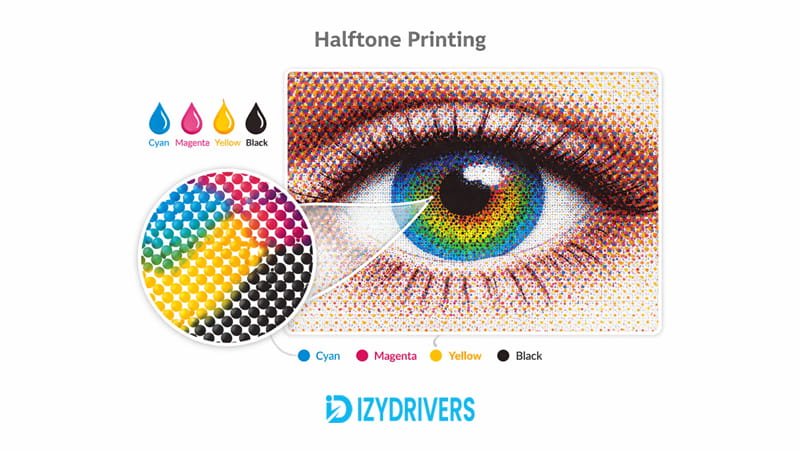
The halftone method is a core part of CMYK in Printing. It uses small dots arranged in patterns to simulate different shades. Instead of changing the color itself, the printer changes the size and density of the dots.
Larger dots create darker areas, while smaller dots produce lighter tones. This technique allows printers to represent gradients without needing additional colors.
Each CMYK channel has its own dot pattern. When combined, these patterns form a complete image. This approach keeps printing efficient while still delivering detailed results.
Dot Patterns and Optical Color Blending
The final image you see is not made of solid color blocks. It is built from thousands of tiny dots. In CMYK in Printing, these dots are placed so close together that the human eye blends them automatically.
This effect is known as optical color blending. Instead of seeing individual dots, the viewer perceives a smooth color transition. This is how printers achieve gradients and subtle shading.
The spacing between dots also matters. Tight spacing increases color intensity, while wider spacing reduces it. By controlling this pattern, CMYK in Printing creates depth and realism in printed images.
Advantages of the CMYK Color Model
CMYK in Printing remains the standard across the printing industry for a reason. It delivers consistent results on physical media, which is critical when producing anything meant for real-world use. From office documents to large-scale production, this model keeps output predictable.
One of the main strengths of CMYK in Printing is color accuracy on paper. While it may not match the brightness of a screen, it produces stable and repeatable tones. This matters when the same file needs to be printed multiple times with minimal variation.
Another advantage is ink efficiency. The system is designed to use controlled amounts of cyan, magenta, yellow, and black. Instead of overloading color inks, the printer balances them with black to maintain depth while reducing waste.
Text reproduction also benefits from this setup. Black ink handles fine details, making letters appear sharp and clean. This is especially noticeable in documents where clarity is more important than color intensity.
In large-scale production, consistency becomes even more important. Commercial printers rely on this model to ensure that prints look the same across different batches. This is why CMYK in Printing is widely used in professional environments where accuracy matters.
Another practical benefit is compatibility. Most printing devices are built around this system, making it easier to prepare files without worrying about unexpected color shifts. This reduces trial and error during production.
For designers and technicians, this model provides control. Adjusting ink percentages allows fine tuning of output, especially for branding materials where color precision is critical.
Limitations of the CMYK Color Model
Despite its strengths, CMYK in Printing has clear limitations. The most noticeable one is its narrower color range compared to RGB. Some bright or highly saturated colors seen on screens cannot be reproduced exactly on paper.
This difference becomes obvious when printing vivid digital images. Colors that appear intense on a monitor may look softer once printed. This is not a defect, but a limitation of how ink interacts with light.
Another challenge comes from file preparation. Many digital files are created in RGB, which means they must be converted before printing. During this conversion, certain colors shift, leading to unexpected results.
In CMYK in Printing, managing these shifts requires experience. Without proper adjustment, prints may not match the original design as expected.
Where CMYK Is Commonly Used in Printing
CMYK in Printing is used in nearly every type of physical output that requires color. It supports both small-scale and large-scale production, making it flexible across different use cases.
Photo printing relies on this system to reproduce images with smooth gradients and balanced tones. While not as bright as digital displays, the results remain consistent and suitable for physical viewing.
In commercial printing, brochures, magazines, and packaging all depend on CMYK to maintain uniform color across large quantities. This ensures that branding and design stay consistent from one print run to another.
Posters and marketing materials also use this approach. The system allows detailed graphics while keeping production efficient.
For everyday needs, color document printing in offices uses the same model. Reports, presentations, and charts all rely on CMYK to produce readable and professional results.
Conclusion
CMYK in Printing defines how printers turn digital files into physical output. It uses four inks—cyan, magenta, yellow, and black—to build colors through controlled layering on paper.
The system works through subtractive mixing, where ink absorbs light and reflects the remaining color. This approach allows printers to create detailed images using limited base colors.
From inkjet to laser devices, the same principle applies. Each printer uses different technology, yet both rely on CMYK to produce consistent results.
Its role as an industry standard comes from reliability. While it cannot match the brightness of digital displays, it delivers stable color output for real-world use.
FAQs About CMYK in Printing
What does CMYK do for printing?
CMYK in Printing controls how colors are produced on paper using four inks. By combining cyan, magenta, yellow, and black in different amounts, printers can create a wide range of colors. This system allows digital images to be translated into physical prints with consistent results.
Is CMYK 72 or 300?
CMYK itself is not tied to resolution. The values 72 and 300 refer to DPI (dots per inch), which affects image sharpness. For printing, 300 DPI is commonly used to ensure clear and detailed output.
What is the CMYK setting for printing?
CMYK settings define how much of each ink is used in a design. These values are usually expressed as percentages. Adjusting them controls color output, allowing fine tuning before printing.
How to use CMYK in printing?
To use CMYK, files must be prepared in the CMYK color mode before printing. This ensures that colors are already adjusted for ink-based output. Most design software provides an option to convert RGB files into CMYK.
Can a normal printer print CMYK?
Yes, most standard printers use CMYK in Printing by default. Inkjet and laser printers both rely on this system, even if users do not adjust settings manually.