Finding the best printers for commercial use in 2025 isn’t as simple as picking the fastest or cheapest machine. Modern businesses—whether small service offices, creative studios, corporate departments, retail environments, or large-scale operations—require printers that can deliver consistent performance, handle heavy workloads, and maintain long-term cost efficiency. As companies rely more on hybrid workflows and digital-to-paper processes, choosing the right commercial model becomes even more critical.
In today’s market, the best printer for commercial use can mean different things depending on your needs. Some businesses prioritize ultra-fast printing and heavy-duty cycles, while others look for multifunction capabilities, wireless integration, or affordable running costs. Commercial printers are designed to operate in demanding office environments where downtime directly affects productivity. That’s why understanding a printer’s technology, print speed, connectivity, and cost efficiency is essential before making a purchase.
Beyond speed and capacity, businesses must also consider how well a machine integrates into existing office networks. Features like secure printing, cloud workflows, Ethernet stability, and mobile print support can significantly improve overall efficiency. This becomes increasingly important as teams become more distributed and rely on seamless access to documents from any device or location.
Finally, the durability and total cost of ownership often determine whether a printer is truly suitable for long-term commercial use. It’s not just about the sticker price—but also toner or ink expenses, maintenance needs, and how efficiently the model handles high-volume output. With so many options on the market, selecting the best printer for commercial use can feel overwhelming, but breaking down the factors that matter most makes it much easier to find the perfect fit.
What to Look for When Choosing the Best Printer for Commercial Use
Below are the essential factors businesses should evaluate when choosing the best printer for commercial use.
Printing Technology: Laser vs. Inkjet for Office Needs
Laser and inkjet printers each offer unique advantages for business environments. Laser printers are typically preferred for high-volume text documents, offering fast output speeds, sharp accuracy, and lower cost per page. They are ideal for corporate offices, legal firms, finance departments, and administrative teams.
On the other hand, a commercial inkjet printer is suitable for creative studios, marketing agencies, photo-heavy workloads, and small offices that value high-quality color output.
Print Speed & Duty Cycle Requirements
Commercial environments rely heavily on output volume. Print speed is usually measured in PPM (pages per minute) or IPM (images per minute). Businesses with high workloads should look for heavy-duty printer models that can handle intense cycles without overheating or slowing down.
Large offices may need machines capable of handling 50,000+ pages per month, while SMEs typically require only 5,000–20,000 pages.
Cost Efficiency & Running Costs
Total cost of ownership matters more than upfront price. Evaluate toner or ink expenses, per-page costs, and whether the printer supports refillable ink tanks or high-yield toner cartridges. A cost-efficient business printer will save money in the long term, especially in commercial spaces where printing happens daily.
Connectivity & Office Integration
Modern offices need printers that integrate easily with multiple devices and platforms. Essential features include Ethernet, Wi-Fi, Wi-Fi Direct, cloud printing, mobile app support, and secure-print authentication.
For hybrid teams, a network office printer or wireless office machine ensures smooth connectivity with minimal downtime.
Multifunction Capabilities
Many businesses benefit from all-in-one printers that include scanning, copying, and faxing. A multifunction printer (MFP) reduces the need for multiple devices and centralizes document management. For small teams and busy offices, an all-in-one office printer improves workflow efficiency and saves space.
The 10 Best Printers for Commercial Use in 2025
| Model | Speed | Duty Cycle | Color / Mono | Functions | Price (Approx.) |
|---|---|---|---|---|---|
| Epson EcoTank Pro ET-5850 | 25 ppm | 66,000 pages/mo | Color | Print / Scan / Copy / Fax | $799 |
| Brother MFC-L3780CDW | 26 ppm | 30,000 pages/mo | Color | Print / Scan / Copy / Fax | $499 |
| Brother MFC-L5900DW | 42 ppm | 80,000 pages/mo | Mono | Print / Scan / Copy / Fax | $499 |
| HP Color LaserJet Pro M479fdw | 28 ppm | 50,000 pages/mo | Color | Print / Scan / Copy / Fax | $649 |
| Canon imageCLASS MF455dw | 40 ppm | 80,000 pages/mo | Mono | Print / Scan / Copy / Fax | $349 |
| Epson Workforce Pro WF-7840 | 25 ppm | 50,000 pages/mo | Color | Print / Scan / Copy / Fax | $299 |
| Xerox VersaLink C405 | 36 ppm | 80,000 pages/mo | Color | Print / Scan / Copy / Fax | $799 |
| Ricoh P C311W | 26 ppm | 50,000 pages/mo | Color | Print Only | $329 |
| Canon MAXIFY GX7021 | 24 ppm | 45,000 pages/mo | Color | Print / Scan / Copy / Fax | $899 |
| HP PageWide Pro 577dw | 50 ppm | 80,000 pages/mo | Color | Print / Scan / Copy / Fax | $799 |
1. Epson EcoTank Pro ET-5850
The Epson EcoTank Pro ET-5850 remains one of the strongest candidates for the best printer for commercial use thanks to its cost efficiency, reliability, and exceptional color output. Built for medium-to-large offices, this business inkjet model delivers fast printing, high-capacity tanks, and unbelievably low running costs. Its supertank system eliminates the need for frequent cartridge replacement, making it a favorite among businesses aiming to cut operational expenses. The ET-5850 also offers crisp text quality and impressive color accuracy, suitable for everything from administrative paperwork to marketing materials.
Designed to perform under daily workloads, the ET-5850 has a robust build and smooth document handling, including duplex printing, a responsive touchscreen panel, and advanced connectivity options. Whether used in workgroups or standalone, it maintains consistent performance that supports office productivity without increasing maintenance load. The ink bottles last for thousands of pages, which means downtime stays low and workflow stays smooth.
Key Features
- Supertank system with ultra-high-yield ink bottles
- Fast color and mono print speeds
- Duplex printing, scanning, and copying
- 50-sheet ADF with reliable double-sided scanning
- Ethernet, Wi-Fi, Wi-Fi Direct, and cloud print support
Pros & Cons
Pros:
- Extremely low running cost
- Excellent color and text quality
- Large ink capacity for high-volume printing
- Strong connectivity and office integration
Cons:
- Higher upfront price
- Slightly larger footprint than standard inkjets
Ideal For
Ideal for companies that print frequently, marketing teams that need rich color output, shared office environments, and businesses seeking a low running cost solution with a dependable business inkjet printer setup.
2. Brother MFC-L3780CDW

The Brother MFC-L3780CDW is a compact and efficient color laser printer built for busy offices that need crisp text, vibrant graphics, and dependable multifunction features. Known for its smooth performance and strong security options, this model provides fast print speeds and reliable handling of large document sets. With laser-class clarity and a low-maintenance design, it’s an excellent choice for commercial environments that prioritize consistency and precision.
This machine supports mobile and cloud printing, making it a flexible solution for hybrid teams. The touchscreen interface is simple to operate, and the device integrates well into networked office environments. Because of its laser technology, pages come out dry and ready to distribute immediately—useful in fast-paced office operations. It also offers excellent scanning features, making it a well-rounded workhorse for small to medium businesses.
Key Features
- Full-color laser printing with sharp text
- Auto-duplex printing
- 50-sheet ADF for fast scanning and copying
- Strong security and network management tools
- Wi-Fi, Ethernet, USB, and cloud workflow support
Pros & Cons
Pros:
- Fast and reliable color print speeds
- Excellent text sharpness
- Strong multifunction capabilities
- Compact design suitable for small offices
Cons:
- Toner replacements can be costly
- Not ideal for photo-heavy printing
Ideal For
Perfect for SMEs, administrative offices, finance teams, and businesses needing an office multifunction printer that offers strong print quality, network reliability, and consistent performance across daily workloads.
3. Brother MFC-L5900DW (Laser All-In-One)
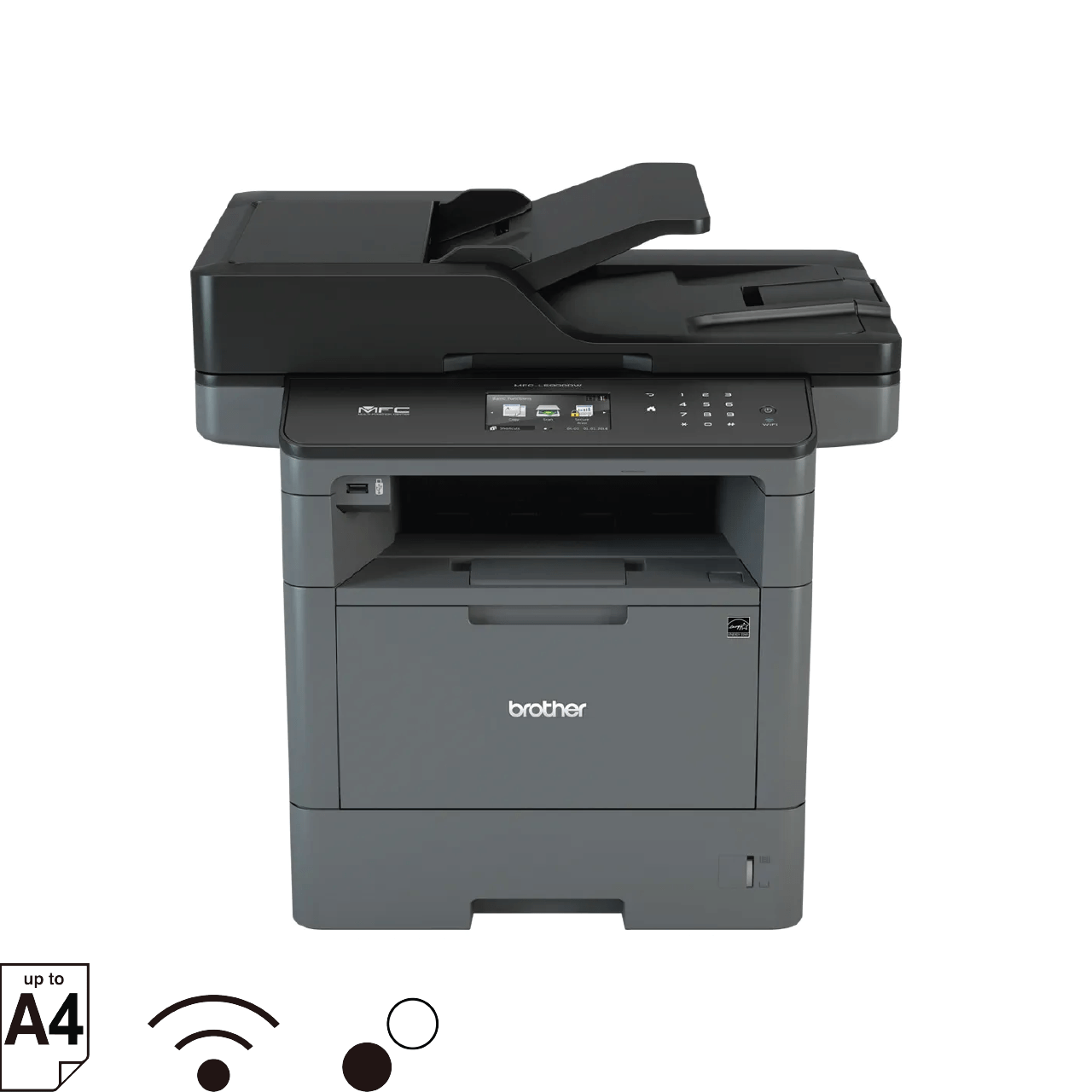
The Brother MFC-L5900DW is engineered for productivity, making it a powerful contender for businesses searching for the best printer for commercial use with heavy-duty text output. This monochrome laser all-in-one machine delivers rapid print speeds, robust document management features, and strong scanning capabilities suitable for fast-moving workplaces. Designed for durability and long-term performance, it can easily support high-volume departments that rely on dependable printing day after day.
Its intuitive control panel, secure print features, and enterprise-grade network tools make it well-suited for departmental integration. With a high-yield toner option and expandable paper capacity, the MFC-L5900DW minimizes interruptions and helps maintain steady workflow. Businesses that deal primarily with documents, forms, reports, and correspondence will particularly appreciate its accuracy and efficiency.
Key Features
- High-speed monochrome laser printing
- 70-page ADF with duplex scanning
- Up to 8,000-page high-yield toner support
- Expandable paper trays for large offices
- Ethernet, Wi-Fi, USB, and mobile print compatibility
Pros & Cons
Pros:
- Very fast print speeds
- Excellent for text and document-heavy workflows
- High-yield toner reduces operational cost
- Secure and easy to integrate in office networks
Cons:
- No color printing
- Slightly noisy at full speed
Ideal For
Ideal for corporate departments, legal offices, logistics teams, and any business needing a high-volume, high-speed laser all-in-one with enterprise-grade durability and long-term reliability.
4. HP Color LaserJet Pro MFP M479fdw
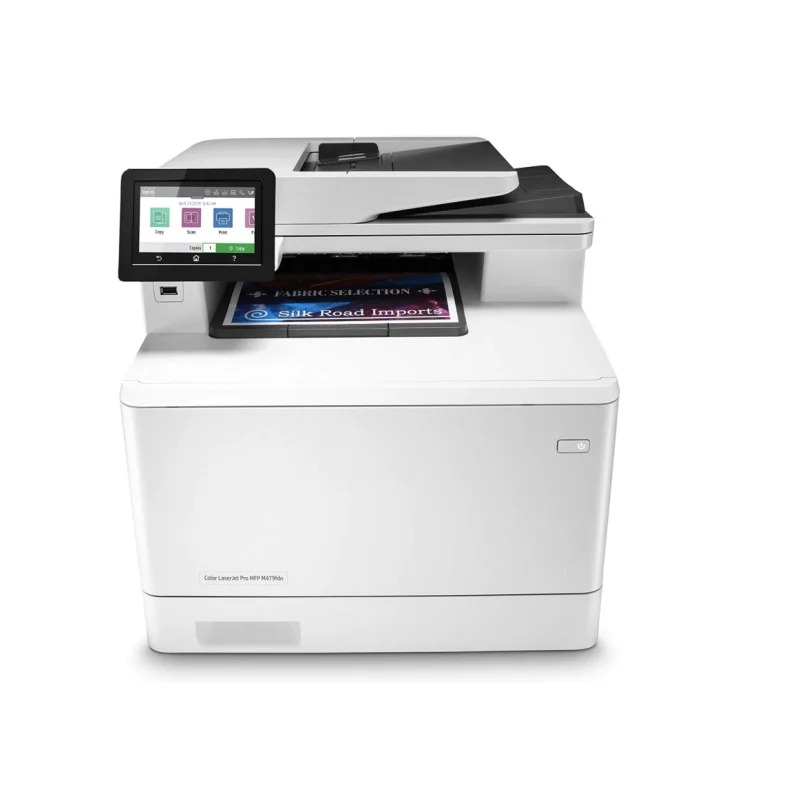
The HP Color LaserJet Pro MFP M479fdw is a premium office machine designed for teams that need reliable performance, sharp color documents, and strong security tools. Known for its smooth workflow automation and class-leading usability, this model remains a favorite among companies searching for the best printer for commercial use with modern connectivity and enterprise-grade features. HP’s security ecosystem—like PIN printing, threat detection, and real-time monitoring—adds another layer of protection for businesses handling sensitive documents.
With fast print speeds and consistent color accuracy, it’s perfect for everyday office materials, including internal reports, presentations, brochures, and client-facing documents. The M479fdw also includes advanced scanning workflows that let teams send files directly to email, network folders, and cloud platforms. Its touchscreen interface is more intuitive than most printers in its class, making it easy for staff to operate without training.
Key Features
- Color laser printing with professional-grade output
- Strong built-in security tools for enterprise use
- Auto-duplex scanning, printing, and copying
- Large touchscreen with workflow shortcuts
- Cloud, mobile, Wi-Fi, and Ethernet support
Pros & Cons
Pros:
- Excellent security and network tools
- Great color accuracy for business documents
- Smooth touchscreen and workflow shortcuts
- Strong overall office integration
Cons:
- Toner is expensive
- Slightly heavy on energy consumption
Ideal For
Ideal for companies that require dependable color output, secure printing, and a multifunction device with extremely reliable office integration.
5. Canon imageCLASS MF455dw

The Canon imageCLASS MF455dw offers outstanding performance for text-heavy environments that rely on speed, clarity, and low maintenance. As a monochrome laser MFP, it focuses on efficiency and reliability—two essential qualities for businesses looking for the best printer for commercial use without unnecessary features. It prints extremely sharp documents and handles scanning tasks with precision, making it suitable for administrative teams and corporate departments.
Its user-friendly touchscreen and workflow shortcuts streamline repetitive tasks such as scanning to email or storing documents in shared folders. Canon’s engine is also known for exceptional durability, meaning minimal downtime even under heavy workloads. With low energy usage and high-yield toner options, operational costs remain reasonable throughout the year.
Key Features
- Fast monochrome printing
- High-quality scanning with duplex support
- Wi-Fi Direct, Ethernet, USB
- Touchscreen with customizable shortcuts
- Optional high-yield toner
Pros & Cons
Pros:
- Excellent text sharpness
- Low maintenance requirements
- Fast startup and print speeds
- Reliable scanning accuracy
Cons:
- Monochrome only
- Toner cost slightly above average
Ideal For
Perfect for SMEs, law firms, logistics teams, and organizations that need a dependable mono laser MFP focused on speed and document handling.
6. Epson Workforce Pro WF-7840
The Epson Workforce Pro WF-7840 is a wide-format business inkjet printer that brings versatility and large-format capabilities to commercial users. It supports up to 13” x 19” printing, making it a powerful choice for teams producing posters, marketing materials, diagrams, engineering layouts, or full-color presentations. This combination of flexibility and performance makes it a strong choice for businesses pursuing the best printer for commercial use with broad media support.
Its PrecisionCore technology ensures sharp text and vibrant color output, rivaling much more expensive office printers. With dual paper trays, a 50-sheet ADF, and fast duplex scanning, the WF-7840 can support moderate workgroups with diverse printing needs. The machine also integrates smoothly into hybrid workflows thanks to cloud print and mobile app support.
Key Features
- Wide-format printing up to 13×19 inches
- PrecisionCore print head for crisp output
- Dual paper trays + rear feed
- Duplex printing, scanning, and copying
- Ethernet, Wi-Fi, and cloud connections
Pros & Cons
Pros:
- Excellent color prints for graphics and marketing
- Wide-format capability
- Strong connectivity and workflow tools
- Good value for its feature set
Cons:
- Ink cost can be high for heavy users
- Large footprint
Ideal For
Ideal for marketing agencies, creative studios, architects, educators, and any business needing wide-format flexibility in an office-ready printer.
7. Xerox VersaLink C405
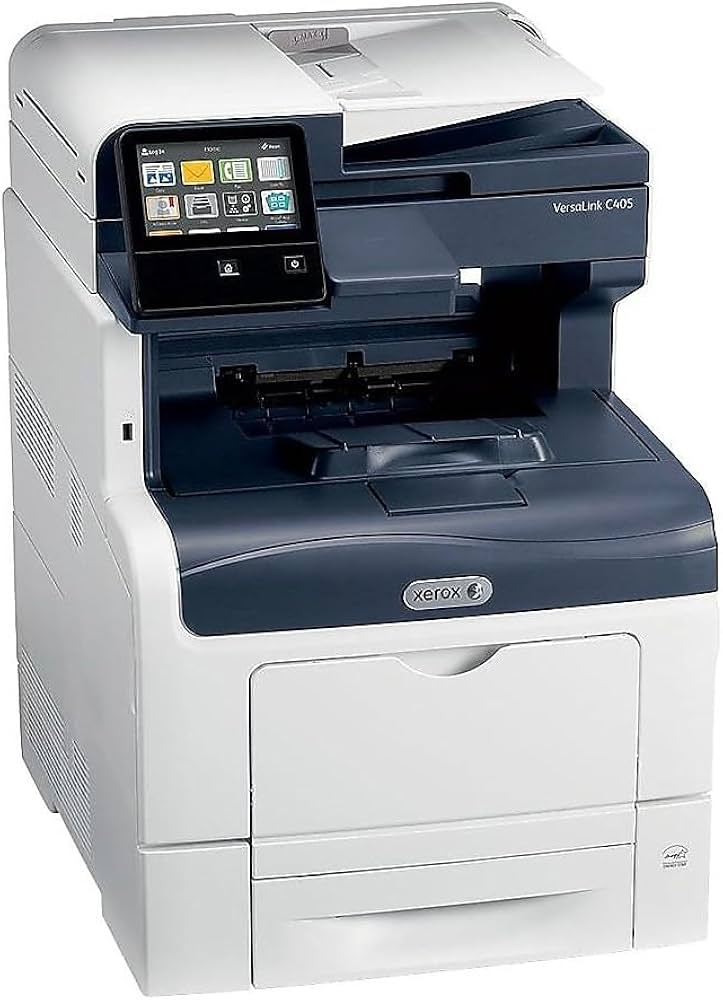
The Xerox VersaLink C405 is a robust color multifunction printer designed for teams that need enterprise-level features without the price tag of large office copiers. With exceptional interface usability, app-based workflows, and strong integration with business software, it’s a versatile machine for organizations looking for the best printer for commercial use with modern productivity features.
Its output quality is consistently sharp, especially for color graphics, making it suitable for client-facing materials. Xerox’s ConnectKey ecosystem allows deep customization, letting businesses automate repetitive tasks and build workflows tailored to their teams. This level of integration is rare in desktop-size printers.
Key Features
- ConnectKey smart touchscreen
- Cloud integrations (Google Drive, OneDrive, Dropbox)
- Excellent color graphics printing
- Strong security and admin controls
- Fast ADF scanning
Pros & Cons
Pros:
- Best-in-class touchscreen interface
- Excellent office software integration
- Strong print quality
- Reliable performance for workgroups
Cons:
- Consumables can be pricey
- Larger than typical desktop MFPs
Ideal For
Great for corporate teams, IT-managed offices, marketing groups, and companies that rely heavily on cloud workflows and automation.
8. Ricoh P C311W
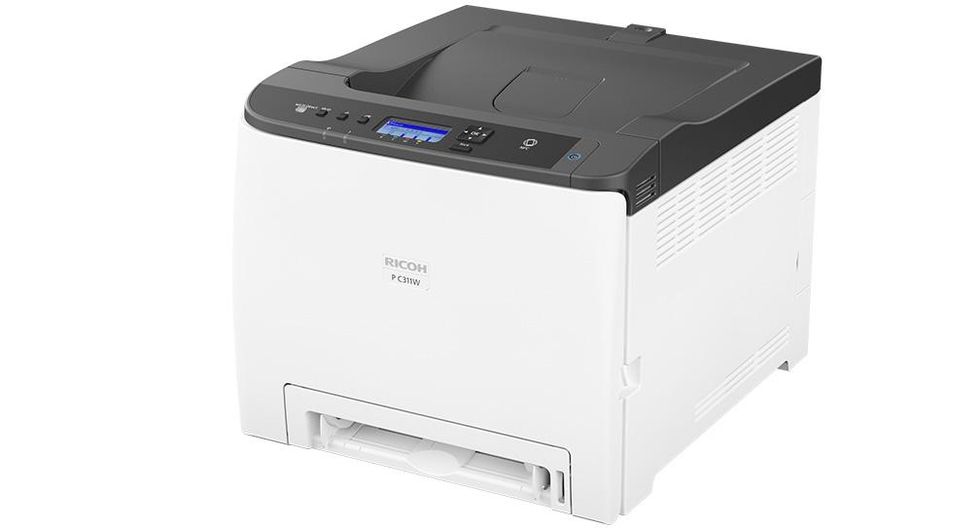
The Ricoh P C311W is a compact but powerful color laser printer designed for small offices and teams that need reliable output without excessive costs or large footprints. Despite its size, it delivers sharp text and strong color consistency, making it a surprisingly capable option for businesses evaluating the best printer for commercial use in the entry-level category.
Its simple setup, Wi-Fi Direct support, and user-friendly management tools make it ideal for hybrid environments. Ricoh’s toner technology ensures long-lasting cartridges and stable color output, making it a low-maintenance choice for everyday office printing.
Key Features
- Compact color laser printing
- Wi-Fi Direct and Ethernet
- Fast first-page-out speeds
- Low energy consumption
- Strong text and color accuracy
Pros & Cons
Pros:
- Small footprint
- Easy to operate
- Reliable print quality
- Efficient toner usage
Cons:
- No scanning/copying features
- Paper tray capacity is modest
Ideal For
Perfect for startups, remote teams, coworking spaces, and businesses that need a simple, reliable color printer without multifunction requirements.
9. Canon MAXIFY GX7021
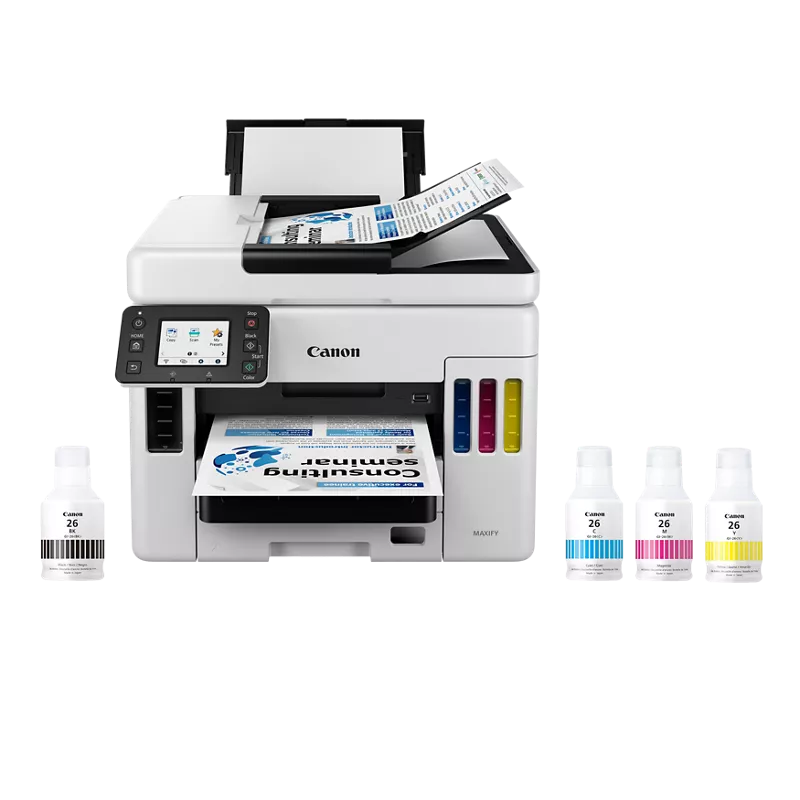
The Canon MAXIFY GX7021 is a high-volume business inkjet with a refillable tank system built for long-term savings. It delivers sharp documents, excellent color reproduction, and extremely low running costs, rivaling even laser printers in efficiency. For companies balancing cost and performance, this model stands out as a top choice for the best printer for commercial use with heavy workloads.
Its large ADF, fast scanning, and strong office integration make it suitable for demanding environments. The tank system drastically reduces the frequency of refills, keeping downtime minimal. With duplex printing and robust paper handling, it performs exceptionally well for multi-department offices.
Key Features
- Refillable tank ink system
- Very low cost per page
- Duplex printing and scanning
- Strong color and text accuracy
- Cloud and mobile workflow support
Pros & Cons
Pros:
- Lowest running cost in its class
- High-quality prints
- Reliable scanning and copying
- Ideal for heavy users
Cons:
- Higher upfront cost than cartridge inkjets
- Not as fast as laser printers
Ideal For
Ideal for SMEs, schools, agencies, service offices, and organizations with high-volume printing needs that want predictable, low-cost operation.
10. HP PageWide Pro 577dw
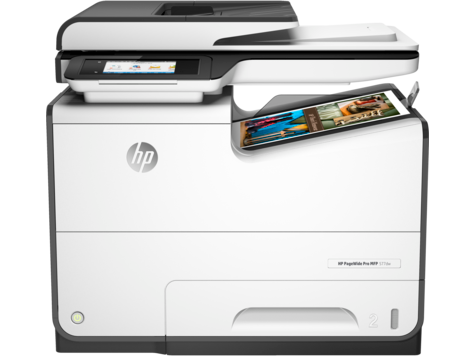
The HP PageWide Pro 577dw is a unique business printer that bridges the gap between laser and inkjet technology. Its PageWide printhead spans the entire page, allowing ultra-fast printing with exceptional clarity. This combination of speed, durability, and efficiency makes it an outstanding candidate for the best printer for commercial use in environments where productivity and print precision matter equally.
The printer delivers extremely sharp text and vivid color graphics while keeping per-page costs low. It supports enterprise-level security features, advanced scanning workflows, and robust connectivity options. For busy teams that need speed without compromising quality, the 577dw is one of the most capable machines available.
Key Features
- PageWide printhead for extremely fast printing
- Low running cost compared to laser printers
- Enterprise security features
- Duplex printing and scanning
- Ethernet, Wi-Fi, USB, mobile printing
Pros & Cons
Pros:
- Among the fastest printers in its class
- Excellent text and color accuracy
- Strong security and workflow tools
- Lower cost per page than laser
Cons:
- Larger footprint
- Ink costs can rise for heavy color users
Ideal For
Perfect for high-demand departments, corporate offices, professional services, and teams that need ultra-fast, professional-quality output with predictable operating costs.
Which Printer Is Best for Your Type of Business?
Choosing the best printer for commercial use depends entirely on the size of your organization, daily workload, and the type of documents your business handles. Each business environment has unique operational patterns, so the ideal machine should match your workflow, not force you to adapt. With so many models offering different capabilities—from wide-format output to enterprise security—identifying the right fit ensures long-term efficiency and keeps costs predictable.
Understanding these differences will make it easier to select the best printer for commercial use that supports your team’s productivity and scales with your business as it grows. Whether you run a small startup or a multi-department corporation, having the best printer for commercial use tailored to your work style can dramatically improve daily operations and document management.
For Small Businesses & Startups
Small businesses often operate in compact spaces and need printers that balance affordability, reliability, and flexibility. A compact business printer with multifunction capabilities is typically the best choice because it reduces the need for separate scanners or copiers. Startups benefit from machines that are easy to set up, require minimal maintenance, and offer wireless connectivity for shared use.
Since print volume is usually moderate, an efficient color inkjet or a small laser MFP provides all the essential features without driving up costs. These businesses also value predictable running costs, so models with refillable tanks or high-yield toner are ideal.
For Medium-Size Offices
Medium-size offices require more robust machines that support multiple users simultaneously. A productivity printer with fast print speeds, strong duty cycles, and reliable network integration helps maintain a smooth workflow even during busy hours. These environments benefit from printers that support secure printing, Ethernet connectivity, and advanced scanning workflows.
A network printer with duplex features and cloud integration keeps collaboration seamless across teams. Mid-sized offices also need devices that can handle large print queues without performance drops, making business-class laser or high-volume inkjet models a great fit.
For Large Enterprises
Large enterprises rely on machines that deliver speed, high-volume capacity, and enterprise-level security. These organizations often require multiple departments to share devices, making enterprise printing solutions essential for reducing downtime and improving efficiency.
Printers in this category should offer robust network management tools, advanced authentication methods, and strong integration with document management systems. High-duty-cycle laser printers or PageWide devices are typically preferred because they can handle heavy workloads consistently. Enterprise environments also benefit from workflow automation, custom shortcuts, and scalable paper tray options.
For Retail Shops, Clinics, and SMEs
Retail operations, medical clinics, and SMEs need printers that focus on reliability and versatility. These environments often require a mix of receipt printing, admin printing, and document management, making compact multifunction devices ideal. A printer that supports fast start-up times, strong connectivity, and low maintenance helps streamline customer-facing tasks.
For clinics, accurate text printing is crucial for prescriptions and reports. Retail shops benefit from machines with solid durability and lower running costs, especially for constant administrative output like receipts, forms, and labels.
For Creative, Architecture, or Technical Work
Creative studios, architects, and engineering teams need printers capable of producing large-format, color-accurate, and technically precise output. A wide-format printer provides the flexibility needed for posters, proofs, CAD drawings, and technical schematics.
These businesses require high resolution, precision color reproduction, and the ability to handle varied media types. A technical printer with strong color calibration, pigment inks, and reliable large-format performance ensures that visual or structural details are represented accurately. These models also tend to support specialized workflows such as borderless printing and high-GSM media.
Tips to Maintain the Best Printer for Commercial Use
Maintaining the best printer for commercial use helps extend its lifespan, reduce running costs, and ensure consistent output quality. Regular care not only prevents common issues like paper jams or faded prints but also keeps operational efficiency high in busy office environments. Simple maintenance routines can go a long way in protecting your investment and avoiding unnecessary downtime, especially for printers used daily across multiple teams.
Optimize Cost Efficiency
One of the most important ways to optimize long-term cost is by managing toner and ink usage carefully. Choosing high-yield cartridges or refillable tank systems ensures predictable expenses and reduces the frequency of replacements. Monitoring print settings, such as using draft mode for internal documents, also helps reduce costs without sacrificing productivity. Establishing a small inventory of toner or ink prevents interruptions and keeps workflows steady.
Toner & Ink Management
Keeping the printer clean plays a major role in maintaining print quality. Regular cleaning of rollers, printheads, and the interior prevents buildup that can cause smudging or streaking. Simple steps—like dusting the paper tray, removing debris, or running the built-in cleaning cycle—help extend printer lifespan and keep output sharp. Offices should also schedule routine maintenance checks to ensure components like ADF rollers, fusers, and trays are functioning smoothly.
Cleaning & Component Care
Proper handling of paper and consumables is equally important. Storing paper in a dry, cool environment prevents curling and reduces the likelihood of jams. Maintaining updated firmware ensures compatibility, security, and performance improvements for office printers. With consistent care, the best printer for commercial use will continue delivering reliable productivity and high-quality output across all business operations.
Conclusion
Choosing the best printer for commercial use ultimately depends on your business size, print volume, and workflow needs. From compact inkjet models for small teams to heavy-duty enterprise laser systems, each category offers unique strengths that can improve productivity and reduce operational costs. By evaluating print speed, duty cycle, running costs, and connectivity, businesses can confidently invest in a machine that supports long-term growth. With the right choice, the best printer for commercial use becomes more than just equipment—it becomes a reliable engine that keeps your daily operations running smoothly.
FAQs: Best Printer for Commercial Use (2025)
What is the best printer for commercial use in 2025?
The best printer for commercial use in 2025 depends on your business requirements. High-volume offices may prefer fast laser printers, while creative or retail environments might choose inkjet or wide-format models. Consider speed, duty cycle, and running costs to find the right fit for your workflow and budget.
Are laser printers better for business?
Laser printers are often better for business environments that require fast output, sharp text, and high monthly duty cycles. They handle large workloads efficiently and offer predictable running costs. However, inkjet models may be better for teams needing vibrant color, wide-format printing, or lower upfront investment.
Which printer is most cost-efficient for offices?
Offices seeking the most cost-efficient solution often choose refillable tank inkjets or mono laser printers with high-yield toner. These provide low cost per page and reliable performance for everyday documents. Evaluating cartridge yield, refill options, and duplex capabilities helps ensure long-term savings.
How do I choose a business printer?
Choosing a business printer starts with assessing print volume, document type, and required features. Look for models with strong duty cycles, fast print speeds, and efficient cartridges. Connectivity options like network integration and cloud printing can also improve team productivity and streamline daily operations.
Which printer brand lasts the longest for heavy-duty use?
Brands known for durability in heavy-duty environments include Brother, HP, and Epson. Their commercial models are engineered with robust components, strong duty cycles, and reliable support resources. Selecting a printer designed specifically for continuous office workloads ensures long-term performance with minimal downtime.