Many printer problems begin with small internal components that rarely get attention during routine maintenance. Most users immediately suspect ink cartridges, clogged nozzles, or worn rollers whenever a printer starts making unusual sounds or stops feeding paper correctly. A damaged printer gear, however, is often responsible for many of these mechanical issues.
This small rotating component helps control paper movement, transfers power from the motor, and keeps the paper feeding mechanism working smoothly during every print cycle.
Once the internal printer mechanism loses synchronization, several problems can appear at the same time. Printers may produce a grinding noise, struggle to pull paper from the tray, or trigger repeated printer paper jam errors.
Some printers even continue operating while the paper remains stuck inside the feed path. These symptoms usually point to wear inside the mechanical drive system rather than cartridge-related issues.
Modern printers rely heavily on precision movement, making every printer gear essential for stable printing performance, accurate paper handling, and long-term mechanical reliability.
What Is a Printer Gear?
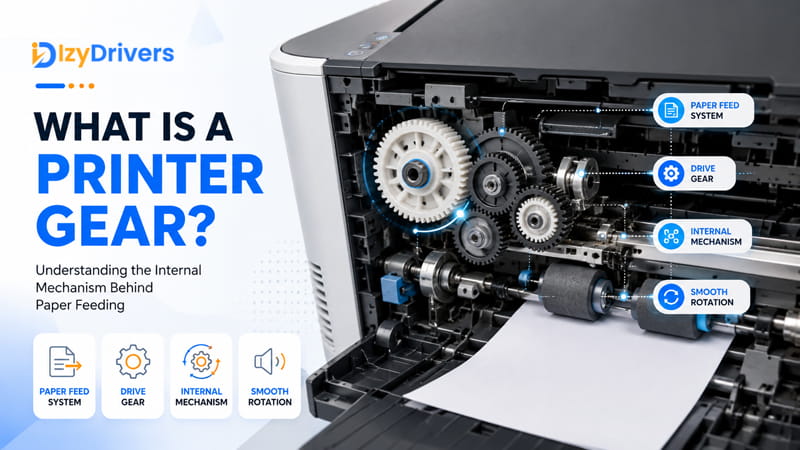
A printer gear is a rotating mechanical component designed to transfer motion and torque between different moving parts inside a printer. These gears work together with the motor, rollers, and internal drive system to move paper through the printer during the printing process. Without proper gear synchronization, paper movement can become unstable, leading to feed errors, paper jams, and noisy operation.
Most printers contain multiple gears connected through a gear train. Each gear has a specific role depending on its position inside the printer mechanism. Some gears rotate the paper pickup rollers, while others control carriage movement or support duplex printing functions. Laser printers also use specialized gears near the fuser assembly to maintain smooth paper movement under high heat conditions.
The main purpose of a printer gear is to convert motor power into controlled mechanical movement. A drive gear connected to the printer motor transfers rotational movement through several smaller gears, allowing the printer to coordinate paper feeding with high precision. This process helps maintain proper timing between the paper feed system and the printhead or toner assembly.
Plastic materials are commonly used for printer gears because they reduce manufacturing costs, lower operational noise, and minimize friction between moving components. Even though plastic gears are lightweight and efficient, they can wear out after years of repeated use. Cracked teeth, slipping gears, and alignment problems often develop after long printing cycles or poor maintenance conditions.
Printers depend on accurate movement during every stage of operation. Even a slightly worn printer gear can interrupt paper flow, affect print alignment, or create loud clicking sounds during printing.
Why Printer Gears Are Important in Modern Printers
Modern printers require precise coordination between multiple moving parts working simultaneously at high speed. Gears help maintain synchronized movement between rollers, motors, and paper transport components throughout the printing cycle. This synchronization allows the printer to feed paper evenly without shifting or skewing during operation.
A properly functioning printer gear also improves mechanical efficiency by reducing unnecessary strain on the motor and feed assembly. Stable movement helps prevent paper misalignment, minimizes internal friction, and supports smoother printing performance over time. Since modern printers handle different paper sizes and duplex printing tasks, accurate gear movement has become even more important for maintaining consistent print quality and reliable paper handling.
How Printer Gears Work Inside a Printer
| Printing Stage | Gear Function | Related Components |
|---|---|---|
| Motor Activation | Transfers rotational power from the motor to the internal drive system | Stepper motor, drive gear |
| Paper Pickup | Rotates pickup rollers to pull paper from the tray | Pickup roller, feed gear |
| Paper Feeding | Maintains steady paper movement through the printer | Gear train, paper feed system |
| Printhead Movement | Controls carriage movement during printing | Carriage assembly, guide rails |
| Duplex Printing | Reverses paper direction for double-sided printing | Duplex unit, reverse gears |
| Final Output | Pushes printed paper toward the output tray | Exit rollers, output gear assembly |
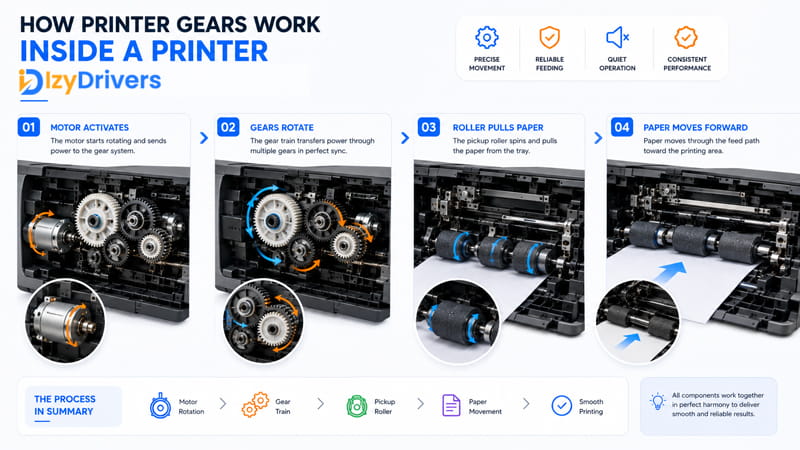
Every printer uses a coordinated mechanical system that converts electrical power into controlled physical movement. The printing process usually begins when the motor activates the internal gear train connected to several rotating components inside the machine. Once the motor starts spinning, the connected gear assembly transfers motion to the paper pickup rollers and other moving parts responsible for paper handling.
During the initial feed process, the pickup roller grabs a sheet of paper from the tray and pushes it toward the main paper path. Several gears continue rotating together to maintain steady paper movement throughout the printer. This synchronized feed mechanism helps ensure the paper travels at the correct speed while remaining properly aligned inside the machine.
Inkjet and laser printers use slightly different internal systems, but both rely heavily on gears for movement control. Inkjet printers commonly use gears to move the carriage assembly carrying the printhead across the paper surface. Laser printers place additional stress on their gears because they operate with heated fuser components and more complex paper transport systems.
As the paper moves forward, multiple rollers and gears continue working together to maintain stable positioning. If one gear becomes damaged or loses alignment, the entire system can become unstable. This often causes uneven paper feeding, loud mechanical sounds, or failed print jobs.
A worn printer gear may also struggle to maintain proper traction between moving components. Once this happens, the printer roller system may slip during operation, preventing the paper from advancing correctly through the feed path.
Main Components Connected to Printer Gears
Several internal components work directly with printer gears during daily operation. Each printer parts plays a specific role in maintaining smooth paper movement and stable printing performance.
- Pickup roller: pulls paper from the tray and guides it into the feed path during the initial printing stage.
- Stepper motor: generates controlled rotational force that powers the internal gear train throughout the printing cycle.
- Carriage assembly: commonly found in inkjet printers, this component moves the printhead across the paper surface using synchronized gears and guide rails.
- Duplex unit: reverses paper direction during double-sided printing by using coordinated gear movement.
- Paper tray mechanism: positions paper correctly before feeding begins to reduce alignment problems and feeding errors.
All of these components rely on stable gear synchronization to maintain accurate paper handling, prevent mechanical stress, and support consistent printer operation.
Common Types of Printer Gears and Their Functions
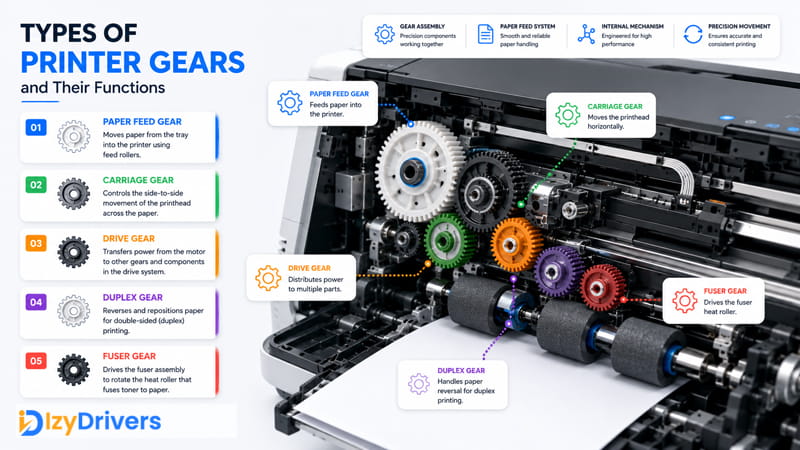
Printers rely on multiple internal gears to coordinate movement between rollers, motors, and paper transport components. Each gear serves a different purpose inside the mechanical system, allowing the printer to feed paper smoothly and maintain stable printing performance. A damaged or worn printer gear can disrupt this synchronization and create several operational problems at once.
Paper Feed Gear
Paper feed gears help move paper through the rollers during the printing process. These gears are usually positioned near the paper tray and rotate whenever the printer pulls paper into the feed path. Since they operate continuously during daily use, feed gears experience constant friction and pressure. Once the teeth begin wearing down, paper feeding problems often become more frequent.
Carriage Gear
Carriage gears are commonly found in inkjet printers. Their main function is to control printhead movement across the paper surface. These gears work together with guide rails and small motors to maintain stable positioning during printing. If the carriage gear becomes loose or damaged, the printhead may move unevenly or produce loud mechanical sounds.
Drive Gear
Drive gears transfer motor power throughout the main drive assembly inside the printer. These gears distribute rotational movement to multiple connected components, including rollers and feed systems. Because they control several mechanical functions at once, even minor damage inside the drive system can affect overall printer performance.
Duplex Gear
Duplex gears support double-sided printing by reversing paper direction during operation. These components are usually located inside the duplex module and help reposition paper for the second printing pass. Worn duplex gears can cause paper alignment problems or incomplete duplex printing cycles.
Fuser Gear
Fuser gears are mainly used in laser printers to rotate heated rollers inside the fuser assembly. These rollers bond toner onto the paper using pressure and heat. Continuous heat exposure places additional stress on these gears, making them more vulnerable to wear over time.
Most manufacturers use plastic gear materials because they are lightweight, cost-efficient, and quieter during operation compared to metal components. Plastic gears also reduce strain on nearby parts and help maintain smoother movement inside the internal drive system.
| Gear Type | Main Function | Common Location |
|---|---|---|
| Paper Feed Gear | Moves paper through rollers | Near paper tray |
| Carriage Gear | Controls printhead movement | Inkjet carriage unit |
| Drive Gear | Transfers motor rotation | Main drive assembly |
| Duplex Gear | Supports double-sided printing | Duplex module |
| Fuser Gear | Controls heat roller movement | Laser printer fuser |
Why Plastic Printer Gears Wear Out Over Time
Plastic gears experience continuous friction during normal printing activity. Every print cycle creates repeated movement between connected parts, gradually wearing down the teeth and reducing movement precision. Heat exposure inside laser printers can also weaken plastic materials, especially near the fuser section where temperatures remain consistently high.
As the material ages, small cracks may develop around the teeth or center shaft. These cracks reduce stability and increase the risk of slipping during operation. Dust accumulation, lack of lubrication, and heavy workloads can accelerate wear even further.
Common Printer Gear Problems and Their Symptoms
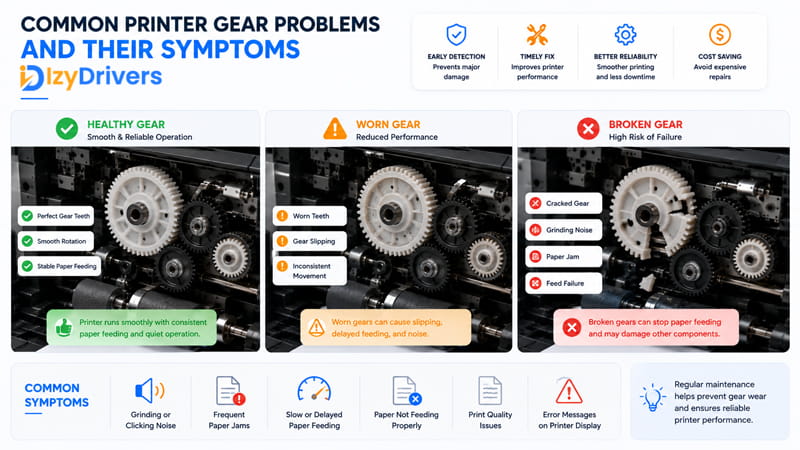
Mechanical problems inside a printer usually begin with small warning signs before developing into serious paper feeding failures. A worn printer gear can affect paper movement, create unusual sounds, and interrupt the printing process without warning. Since the internal feed system depends on synchronized movement, even minor gear damage may disrupt overall printer performance.
Gear Slipping
Gear slipping happens when worn teeth fail to maintain proper contact with connected rotating components. As the gears lose grip during operation, paper movement becomes unstable and inconsistent.
This problem can cause:
- delayed paper pickup
- interrupted paper feeding
- uneven movement inside the feed path
- printers stopping in the middle of a print job
Slipping gears are especially common in older printers that experience heavy daily workloads or poor maintenance conditions.
Printer Grinding Noise
A loud printer grinding noise is one of the clearest signs of internal mechanical wear. Grinding sounds usually appear when damaged gears create excessive friction while rotating.
The noise often becomes more noticeable:
- during startup
- while pulling paper from the tray
- during duplex printing
- when the rollers begin rotating
In many cases, grinding noises continue even though the paper fails to move properly through the printer.
Clicking Sounds During Printing
Repeated clicking sounds often indicate alignment problems inside the gear train. A damaged or misaligned gear may repeatedly skip over worn teeth during rotation, producing rhythmic clicking noises while the printer operates.
This issue may also signal:
- cracked gear teeth
- unstable gear positioning
- loose internal components
- uneven rotational movement
Ignoring clicking sounds for long periods can increase wear on nearby components inside the drive system.
Paper Feed Failure
Paper feed issues are commonly linked to internal mechanical wear. Once the feed system loses synchronization, the printer may struggle to grab paper correctly or move it consistently through the paper path.
Common symptoms include:
- paper not pulling from the tray
- multiple sheets feeding at once
- delayed feeding response
- paper stopping before the print area
According to technical guidance published by HP Support, paper feed problems often occur when the internal paper transport mechanism fails to engage paper correctly. HP also notes that printers may continue producing operational sounds even when the feed system cannot move paper normally.
Frequent Paper Jams
Repeated paper jams often appear after a damaged printer gear can no longer maintain stable roller movement. Once paper positioning becomes inconsistent, sheets may shift unexpectedly or stop completely inside the feed path.
Frequent jams may occur:
- near the pickup roller
- inside the duplex unit
- close to the fuser assembly
- before the paper reaches the output tray
Over time, unstable paper movement can place additional stress on the rollers and surrounding feed components.
Uneven Paper Feeding
Uneven feeding happens when connected gears rotate inconsistently during operation. Some sheets may move too slowly while others enter the feed path at incorrect angles.
This condition often leads to:
- skewed paper alignment
- incomplete printing
- wrinkled paper
- unstable print positioning
Printers with worn feed gears are especially vulnerable to irregular movement during high-volume printing tasks.
What Causes Printer Gear Failure?
Several factors can shorten the lifespan of internal gears and increase the risk of mechanical failure. Dust buildup is one of the most common causes because fine particles collect around rotating components and increase friction during operation. Over time, accumulated debris can interfere with smooth movement inside the internal mechanism.
Poor printer maintenance also contributes to premature wear. Printers that rarely receive cleaning or inspection often develop lubrication problems that place additional stress on moving components. Without proper lubrication, gears experience higher resistance and faster tooth deterioration.
Excessive usage can accelerate gear wear as well. High-volume printers operate continuously for long periods, placing repeated pressure on the same rotating components. This constant stress gradually weakens the gear surface and reduces movement precision.
Low-quality plastic materials may crack more easily under heavy workloads or prolonged heat exposure. Once the teeth become damaged, connected rollers and feed systems may begin slipping during operation.
In several printer repair discussions, technicians reported that slipping plastic gears often produce grinding noises before triggering paper feed issues. Real-world repair cases also show that worn internal gears can eventually prevent the printer from pulling paper correctly, especially in heavily used printers.
Why Older Printers Are More Vulnerable to Gear Problems
Older printers often experience more severe mechanical wear because their internal components have been exposed to years of repetitive movement and heat stress. Aging plastic gradually becomes more brittle over time, increasing the risk of cracked teeth and unstable rotation.
Long-term friction inside the drive system can also weaken connected gears and rollers. As the mechanical system loses precision, older printers become more vulnerable to slipping gears, unstable feeding, and noisy operation during daily use.
How to Maintain Printer Gears Properly
Regular maintenance helps reduce mechanical wear and keeps the internal feed system operating smoothly over long periods of use. Since gears rotate continuously during printing, even small amounts of dust or friction can gradually affect movement precision. A neglected printer gear is more likely to develop slipping problems, unstable paper feeding, or loud operational noises.
Clean the Internal Feed Area Regularly
Dust, paper particles, and dried debris often collect around rollers and rotating components inside the printer. Over time, this buildup increases friction and places additional strain on the gear train.
Cleaning the paper feed system periodically helps:
- reduce movement resistance
- improve paper handling
- prevent uneven feeding
- minimize internal wear
Soft brushes, compressed air, or lint-free cloths are commonly used to remove loose debris without damaging sensitive components.
Use Proper Gear Lubrication
Continuous movement creates friction between connected rotating parts. Proper gear lubrication helps reduce surface wear and maintain smoother operation inside the printer.
Only small amounts of manufacturer-approved lubricant should be applied because excessive lubrication may attract dust and contaminate nearby rollers or sensors. Over-lubricating gears can sometimes create additional movement problems instead of improving performance.
Avoid Overloading the Paper Tray
Overloading the tray forces the pickup system to work harder during every print cycle. This added pressure increases stress on rollers, gears, and connected feed components.
To reduce unnecessary strain:
- avoid stacking excessive paper
- keep paper aligned properly
- use recommended paper capacity limits
- remove damaged or curled sheets
Reducing workload pressure helps extend the lifespan of each printer gear inside the feed mechanism.
Use High-Quality Paper
Paper quality directly affects long-term printer maintenance. Cheap or dusty paper creates more debris during operation, increasing friction inside the internal drive system.
Using proper paper helps:
- reduce dust buildup
- improve feeding consistency
- lower roller wear
- protect moving components
Paper that matches the printer’s recommended specifications usually produces smoother and more stable movement during printing.
Inspect Mechanical Components Periodically
Regular inspection helps identify developing problems before serious damage occurs. Grinding sounds, delayed paper pickup, unusual vibration, or unstable movement often indicate early mechanical wear inside the gear train.
Checking the internal mechanism periodically can help detect:
- worn gear teeth
- loose rotating parts
- slipping rollers
- alignment problems
- excessive debris accumulation
A properly maintained printer gear supports quieter operation, smoother paper handling, and more reliable long-term printing performance.
Maintenance Mistakes That Can Damage Printer Gears
Several common habits can accelerate wear inside the internal drive system. Forcing jammed paper out of the feed path may damage connected gears and rollers during removal. Cheap paper often creates excess dust that increases friction around rotating components.
Overloading the paper tray places additional stress on the pickup system and weakens movement precision over time. Ignoring grinding noises is another major mistake because unusual sounds often appear before serious gear failure develops.
Can a Printer Gear Be Repaired or Replaced?
Some mechanical problems can be repaired temporarily, but severe gear damage usually requires replacement. Small alignment issues or minor slipping problems may improve after cleaning and lubrication, especially if the wear is still limited. However, cracked teeth or heavily worn components often continue causing paper feed problems even after basic maintenance.
In many cases, replacing a damaged printer gear is more reliable than attempting repeated temporary repairs. Replacement parts are available in both OEM and compatible versions depending on the printer model and budget requirements. OEM parts typically provide better durability and movement precision, while compatible components are usually more affordable.
Before installing a replacement gear, it is important to inspect nearby rollers and connected moving parts for additional wear. Internal damage can spread through the drive system if faulty components remain inside the printer.
For older printers with severe mechanical wear, professional printer repair may be more practical than repeated troubleshooting attempts.
Conclusion
Internal gears play a critical role in maintaining stable printer operation and accurate paper handling. Every printer gear works together with rollers, motors, and feed components to support smooth movement throughout the printing cycle. Once these components begin wearing down, paper feeding problems, grinding noises, and unstable movement often become more common.
Proper maintenance remains one of the best ways to reduce mechanical wear and extend the lifespan of the paper feeding system. Regular cleaning, careful paper usage, and early inspection can help prevent unnecessary strain on the internal printer mechanism.
Paying attention to warning signs such as clicking sounds, delayed paper pickup, or repeated jams can also reduce the risk of more expensive repairs later. Early detection allows damaged components to be repaired or replaced before they affect the entire printer system.
A properly maintained printer gear helps preserve printing stability, reduces mechanical stress, and supports more reliable long-term performance.
FAQs About Printer Gear
What does a printer gear do?
A printer gear transfers rotational movement between the motor, rollers, and internal feed components to support stable paper movement during printing.
Why does my printer make grinding noises?
Grinding noises usually indicate worn gears, excessive friction, or damaged rotating components inside the paper feed mechanism.
Can a broken printer gear cause paper jams?
Yes. Damaged gears can interrupt paper movement and cause repeated paper jams inside the feed path.
How long do printer gears usually last?
Gear lifespan depends on usage, maintenance, paper quality, and printer workload. High-volume printers often experience faster wear.
Is replacing a printer gear expensive?
Costs vary depending on the printer model and part availability. Basic gear replacements are usually less expensive than replacing major assemblies.