RGB color in printing often catches people off guard when a design that looks crisp and vibrant on screen turns flat or slightly different on paper. Everything may look perfect before printing, yet the final result tells a different story. The shift comes from how colors are produced on screens compared to how they appear once ink touches paper.
RGB color in printing becomes important at this stage. Digital devices build color using light, not ink, which makes images look bright and clean on displays. That same approach does not carry over directly into the printing process, where colors are formed in a completely different way.
A closer look at the digital color model used by most screens reveals the cause. Screen colors rely on light blending, while printed output depends on ink behavior. That gap explains why conversion is needed, and why results often change during printing.
What Is RGB Color in Printing?
At its core, RGB color in printing refers to how digital colors behave when they move from a screen into a printed format. RGB itself belongs to the digital world, where color is produced through light. Printers, on the other hand, rely on ink and absorption.
This mismatch leads to color shifts. A bright blue on a monitor may appear darker or less saturated on paper. The issue does not come from the file being wrong. It comes from the difference between color systems.
In everyday use, RGB color in printing becomes relevant the moment a digital image is prepared for physical output. Designers, photographers, and even casual users run into it when printing photos or documents.
The key idea is simple. RGB is not designed for printing. It is designed for screens. When that system gets pushed into print, conversion steps take place behind the scenes. Those steps define how close the final output will match the original.
RGB color in printing reduces unexpected results during printing. Files look closer to what appears on screen when handled correctly.
Understanding the RGB Color Model
The RGB color model builds color using three components: red, green, and blue. These are known as the primary colors of light, not ink. Each color adds brightness as it increases in intensity.
According to the editors of Encyclopaedia Britannica, the RGB color model is an additive color system that creates colors by combining different intensities of red, green, and blue light. When all three colors are combined at full intensity, the result is white light.
This explains why screens can produce vivid tones. They emit light directly, layer by layer, using an additive color model. That approach allows a wide range of color variation.
When discussing RGB color in printing, this model becomes important. The way colors are built on screens does not match how ink behaves on paper. That difference is the root of most printing inconsistencies.
Digital visuals rely fully on this light-based system. So when files move into print, adjustments must be made to translate that light into ink.
How RGB Colors Are Represented Digitally
Each color in RGB is stored using numerical values. These values range from 0 to 255 and represent intensity levels for red, green, and blue. This structure forms the basis of digital color representation.
Every pixel on a screen holds three values. Together, they define the final color seen by the human eye. This system is often referred to as a pixel color system, where millions of tiny points build a complete image.
When working with RGB color in printing, these values play a major role. A slight change in numbers can produce a noticeable shift in output once printed.
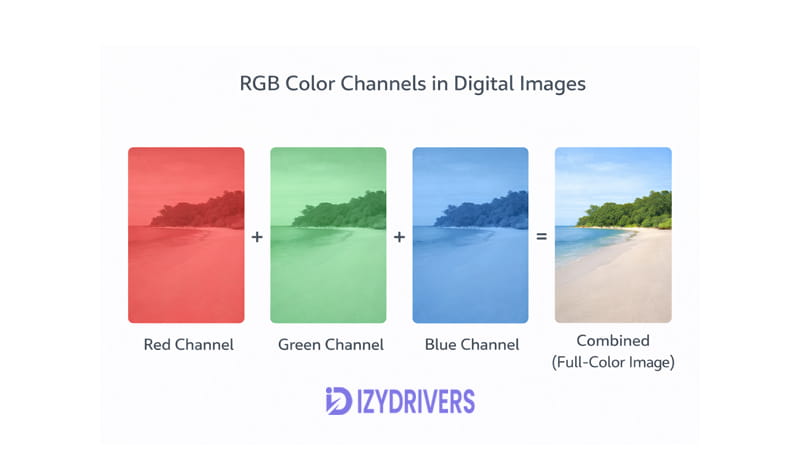
Color channels operate independently. Red, green, and blue channels each contribute to the final result. Software reads these channels and displays them instantly on screen.
Even though this system works perfectly for displays, it does not translate directly into ink-based output. That is where conversion becomes necessary in RGB color in printing workflows.
RGB Values and Color Combinations
A few basic examples make RGB easier to grasp:
- Red: (255, 0, 0)
- Green: (0, 255, 0)
- Blue: (0, 0, 255)
These combinations represent full intensity in one channel while others stay at zero. Mixing values creates new colors. For example, (255, 255, 0) produces yellow.
In RGB color in printing, these combinations can shift during conversion. Bright tones often lose intensity once translated into ink.
RGB values give a clear picture of how colors may shift during printing. Small adjustments can prevent major differences in the final output.
How the RGB Color Model Works
The RGB system operates through light emission. Instead of absorbing color like ink, it adds light in layers. This is known as additive color mixing, and it allows screens to generate millions of colors.
When working with RGB color in printing, this mechanism explains why digital colors often appear brighter. Light creates intensity that ink cannot fully replicate.
Each pixel combines red, green, and blue light in different strengths. The result is a smooth gradient of tones. This system forms the backbone of all digital display colors.
The gap between light-based color and ink-based color creates the main challenge in printing. Knowing how RGB behaves makes it easier to manage the gap between screen and print results.
Additive Color Mixing Explained
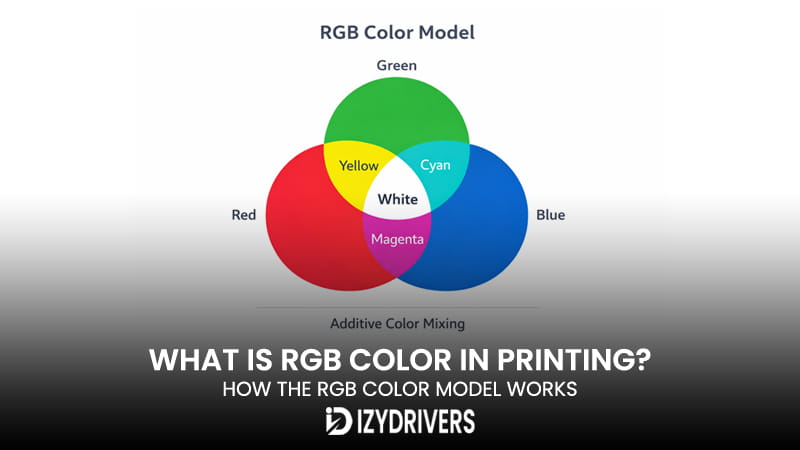
In an additive color mixing system, colors are created by adding light together. Starting from black (no light), each added color increases brightness.
Red and green create yellow. Blue and green create cyan. When all three combine at full strength, the result becomes white.
This light based color system allows precise control over brightness and saturation. It also explains why screens can display vivid neon tones that printers struggle to reproduce.
Within RGB color in printing, this difference becomes clear during conversion. Ink cannot emit light, so it cannot match the same intensity.
That limitation leads to adjustments. Software often compresses colors into a smaller range that printers can handle.
Why RGB Creates Bright Digital Colors
Screens generate color by shining light directly toward the viewer. This creates strong contrast and sharp visuals.
That is why digital display colors often appear more vibrant than printed ones. The brightness comes from emitted light, not reflected surfaces.
In RGB color in printing, this advantage becomes a limitation. Once light is removed and replaced with ink, the same color loses energy.
This behavior sets realistic expectations before sending files to print.
Devices That Use RGB Color Systems
RGB is used across nearly all digital devices. Monitors rely on it to display images. Smartphones use it for apps, photos, and videos. Cameras capture images in RGB before processing.
Scanners also depend on RGB to interpret incoming visuals. They convert physical images into digital data using the same color structure.
This wide adoption explains why RGB display system dominates digital media. It aligns perfectly with how screens function.
In the context of RGB color in printing, these devices act as the starting point. Every image begins in RGB before any conversion takes place.
The monitor color model plays a major role in how users perceive their work. If the screen is not calibrated, the printed result may differ even more.
Digital imaging workflows depend heavily on consistency. From capture to display, RGB remains the standard.
Why Digital Screens Depend on RGB
Screens rely on light to produce images. RGB fits this requirement perfectly. Each pixel emits controlled light to form colors.
This system supports high detail and wide color range. It also allows real-time rendering across devices.
In RGB color in printing, this strength becomes a mismatch. Print does not use light emission. It uses ink layers instead.
That difference is why conversion steps are necessary before printing.
RGB vs CMYK in Printing
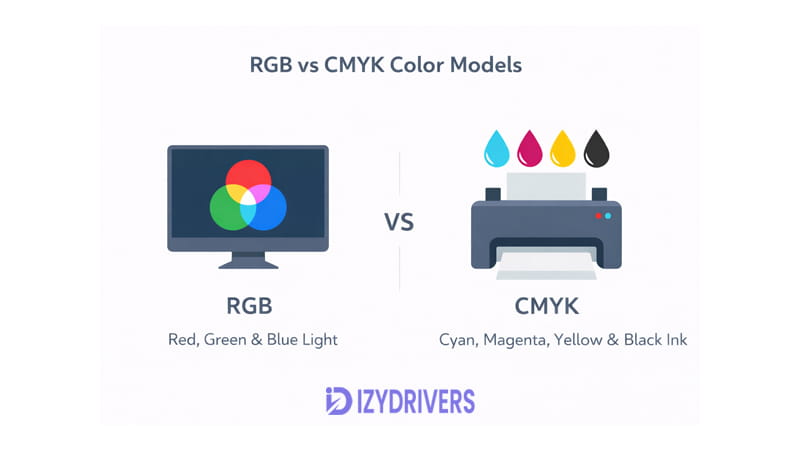
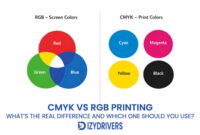
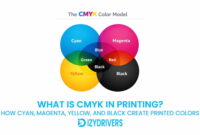
The transition from RGB to print introduces a second color system: CMYK. This system uses cyan, magenta, yellow, and black to produce color through ink.
The contrast between RGB vs CMYK defines most color issues in printing. One uses light, the other uses pigment.
These printing color models explain why files often need adjustment before printing
The Difference Between Additive and Subtractive Color
RGB follows an additive color model. It builds color by adding light. CMYK follows a subtractive model. It creates color by absorbing light from paper.
This difference shapes how colors appear. RGB produces brighter tones. CMYK produces more muted results.
In RGB color in printing, this shift is unavoidable. Files must be converted from additive to subtractive systems.
That conversion affects saturation, brightness, and detail.
Why Printers Use CMYK Instead of RGB
Printers rely on CMYK due to how ink works on paper. Ink absorbs light rather than emitting it.
Based on reports from Courier Graphics Corporation, printing systems rely on the CMYK color model since printed colors are formed by layering ink that absorbs light from white paper, while RGB generates color through emitted light on screens.
This explains why RGB color in printing cannot be used directly. The system simply does not match how printers operate.
Quick Comparison of RGB and CMYK
| Feature | RGB | CMYK |
|---|---|---|
| Color system | Additive | Subtractive |
| Primary colors | Red, Green, Blue | Cyan, Magenta, Yellow, Black |
| Used for | Screens and digital devices | Printing and physical media |
| Color creation | Light emission | Ink absorption |
This comparison highlights the key differences in RGB color in printing workflows. It also shows why color conversion plays a central role in preparing files for print.
Why RGB Colors Look Different When Printed
One of the most common issues people face is simple: colors look great on screen, then shift once printed. Bright tones lose intensity, and some shades feel completely off. This happens even when the file looks perfect before printing.
The root of the problem sits in how color is produced. Screens rely on light, while printers rely on ink. That gap directly affects RGB color in printing, especially when files move from digital display to physical output.
Another factor is how wide a color range each system can handle. Screens can show colors that printers simply cannot reproduce. This limitation leads to visible print color differences, even with high-end devices.
On top of that, the color conversion process plays a major role. Every time a file shifts from RGB to CMYK, adjustments happen automatically. Those changes are not always predictable, which is why RGB color in printing often surprises users.
The final result depends on several factors working together. File settings, software, and printer behavior all influence how colors appear on paper.
Color Gamut Differences
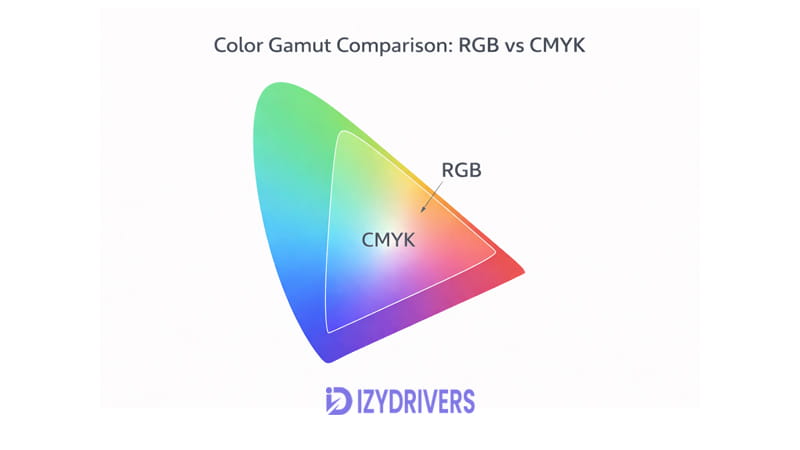
The term color gamut refers to the range of colors a system can produce. RGB has a much wider gamut compared to CMYK. This means screens can display more vibrant and saturated colors than printers can reproduce.
Neon tones are a good example. Bright greens, electric blues, and intense reds often fall outside the printable range. When these colors are sent to print, they get compressed into a smaller gamut.
This compression causes visible shifts. Colors may look dull, darker, or slightly different from the original. In RGB color in printing, this is one of the biggest sources of inconsistency.
The limitation does not come from poor quality. It comes from physical constraints. Ink on paper cannot match the brightness of light on a screen.
For users, this explains why some designs never look identical after printing. Adjustments must be made to keep colors within a printable range.
The RGB to CMYK Conversion Process
Every print job involves color conversion. Files created in RGB must be translated into CMYK before printing. This step can happen in design software or inside the printer driver.
Software conversion usually gives more control. Programs like Photoshop allow manual adjustments before export. This helps reduce unexpected shifts during RGB color in printing.
Printer driver conversion works automatically. The printer handles the process without user input. While convenient, it often leads to less predictable results.
Each system interprets colors differently. The same RGB file may produce different outputs depending on the conversion method used.
This is why preparation matters. Converting files before printing gives better control over final results. It also helps minimize print color differences.
Common Color Shifts in Printing
Certain colors tend to change more than others during RGB color in printing:
- Neon green often turns into a flatter green
- Bright blue may appear darker or slightly purple
- Vivid red can lose intensity and look muted
These shifts come from gamut limits and conversion rules. They are common in most printing setups.
Knowing which colors are sensitive helps avoid surprises. Adjustments made early in the workflow can improve consistency in the final print.
Color Management and ICC Profiles in Printing
Consistent color output does not happen by accident. It requires control across the entire workflow, from screen to printer. This is where color management becomes essential.
In RGB color in printing, color management helps maintain accuracy during conversion. Without it, results can vary widely between devices.
Every device handles color differently. Monitors display colors based on light output, while printers rely on ink behavior. Matching these systems requires a shared reference.
That reference comes in the form of an ICC profile. It acts as a bridge between devices, allowing colors to stay consistent across different stages.
Proper setup reduces guesswork. It also improves reliability, especially in professional printing environments.
What Is an ICC Color Profile
An ICC profile is a data file that defines how a device reproduces color. It describes the color characteristics of monitors, printers, and scanners.
In RGB color in printing, ICC profiles ensure that colors remain consistent during conversion. They help translate RGB values into accurate CMYK output.
Without an ICC profile, each device interprets color differently. This leads to mismatched results between screen and print.
Profiles are created through testing and measurement. They capture how a device behaves under specific conditions.
Using the correct profile helps maintain color accuracy. It also reduces unexpected shifts during printing.
How Color Management Improves Print Accuracy
A proper color management workflow starts with calibration. Monitors need to display colors accurately before any adjustments are made. This step is known as color calibration.
Once the screen is calibrated, files can be prepared with better confidence. Colors seen on screen will be closer to the final output.
Printer settings also play a role. Each printer has its own color response. Matching it with the correct ICC profile improves consistency in RGB color in printing.
Workflow design matters as well. Files should move through a controlled process, from editing to printing. Skipping steps often leads to errors.
When everything is aligned, color accuracy improves significantly. The gap between screen and print becomes smaller and more predictable.
Conclusion
RGB is built for digital displays. It uses light to create vibrant and detailed visuals. Printers work differently, relying on ink and absorption.
This difference explains why RGB color in printing often produces unexpected results. Colors must be converted before printing, and that process affects how they appear.
Gamut limits, conversion steps, and device behavior all play a role. Together, they shape the final output on paper.
Managing these factors improves consistency. With the right setup, RGB color in printing can produce results that closely match the original design.
FAQs About RGB in Printing
What is RGB color in printing?
RGB color in printing refers to how digital RGB colors behave when converted for print output.
Why do printers not use RGB?
Printers use ink, not light. RGB relies on light, which does not apply to physical printing.
Can RGB images be printed?
Yes, but they must go through color conversion before printing.
Why do RGB colors look different when printed?
Differences in color systems and gamut limits cause visible shifts.
Should images be converted to CMYK before printing?
Yes. Converting files early gives better control over final print results and reduces issues in RGB color in printing.